
Lookups

How to add a tip to an online Stripe checkout

Stripe Checkout and Payment Links have no tip setting. Stripe's tipping features run on Terminal card readers, and the online option, "customers choose what to pay", lets the buyer set the whole price instead of adding to yours. Four workarounds collect a tip online anyway. Each is below with its code, followed by the places they go wrong and a hosted checkout where the tip prompt is a setting.

Verified against official documentation · last reviewed 2026-09-18 · send a correction

The closest thing Stripe has to an online tip is a price the buyer fills in. Payment Links call it "customers choose what to pay"; in the API it is custom_unit_amount:

Bash
curl https://api.stripe.com/v1/prices \
  -u "sk_test_...:" \
  -d currency=usd \
  -d "custom_unit_amount[enabled]=true" \
  -d "custom_unit_amount[preset]=500" \
  -d product=prod_...

A Checkout Session or Payment Link built on that price takes nothing else. Stripe's docs list the limits: no other line items, a quantity of 1, no promotion codes or discounts, and no recurring payments or optional items. That makes it a tip jar, where the tip is the whole payment. It cannot put a tip on top of a $120.00 service in the same checkout.

Which path applies to you

What you haveYour path
A Checkout Session your server createsAsk on your page, send the tip as a line item
A Payment Link, with no server codeFixed tip add-ons with optional items
The Payment Element on PaymentIntentsYour own tip selector
The buyer wants to tip after payingA tip jar link on your confirmation page
A card reader, in personTerminal on-reader tipping
You want percent buttons and a custom amount on the hosted payment pageTipping on Flint

Where Stripe supports tipping today

Stripe documents two tipping features, and both belong to Terminal:

  • On-reader tipping. The card reader shows three suggestions before the customer presents a card: percentages, fixed amounts, or smart tips that switch between the two at a threshold you set. The customer can also enter a custom tip or leave none. It runs on the Stripe Reader S700 and S710, the BBPOS WisePOS E, and the BBPOS WisePad 3, and the tip comes back on the PaymentIntent in amount_details.tip.
  • On-receipt tipping. The tip is written on a paper receipt and added when you capture the payment. It needs manual capture and is available in the US only.

Neither reaches a browser. Online, the hosted payment page offers quantity controls, optional items, promotion codes, and custom fields, and no tip prompt. The four workarounds below build one out of those parts or out of your own UI.

Checkout Sessions: ask on your page, send the tip as a line item

Your cart page shows the tip buttons, works out each percentage from your subtotal, and posts the buyer's choice to your server. The server validates the amount and appends one more line item when it creates the session:

JavaScript
// The buyer chose a tip on your cart page. Recompute it on the server
// from your own subtotal; never trust an amount from the browser.
const tipAmount = clampTip(req.body.tip_amount, cartSubtotal);

const session = await stripe.checkout.sessions.create({
  mode: "payment",
  line_items: [
    ...cartLineItems,
    ...(tipAmount > 0
      ? [
          {
            quantity: 1,
            price_data: {
              currency: "usd",
              unit_amount: tipAmount,
              // A Product named "Tip" with tax_code txcd_00000000
              product: process.env.STRIPE_TIP_PRODUCT_ID,
            },
          },
        ]
      : []),
  ],
  payment_intent_data: { metadata: { tip_amount: String(tipAmount) } },
  success_url: "https://example.com/thanks?session_id={CHECKOUT_SESSION_ID}",
  cancel_url: "https://example.com/cart/tip",
});

The buyer sees "Tip" as a product row on Stripe's page. Use a real Product for it rather than inline product_data: a Product can carry the Nontaxable tax code, and coupons can be scoped away from it. Both matter in the traps below.

Payment Links: fixed tip add-ons with optional items

Optional items are Stripe's upsell feature: up to 10 extra products the buyer can add on the payment page, on Checkout Sessions and Payment Links alike. A $1.00 "Tip" price with an adjustable quantity works as a tip stepper with no server code:

Bash
# price_tip_100 is a one-time $1.00 price on a Product named "Tip"
curl https://api.stripe.com/v1/payment_links \
  -u "sk_test_...:" \
  -d "line_items[0][price]=price_..." \
  -d "line_items[0][quantity]=1" \
  -d "optional_items[0][price]=price_tip_100" \
  -d "optional_items[0][quantity]=5" \
  -d "optional_items[0][adjustable_quantity][enabled]=true" \
  -d "optional_items[0][adjustable_quantity][minimum]=0" \
  -d "optional_items[0][adjustable_quantity][maximum]=50"

The buyer adds the item and sets how many dollars to tip. There are no percentages and no typed amount, the control reads as a product add-on rather than a tip prompt, and the buyer can always remove it. Optional items cannot be combined with pay-what-you-want prices, so a free-form tip field is still out of reach on the link.

Payment Element: your own tip selector

With the Payment Element you own the page, so the tip selector is yours to build. When the buyer picks a tip, update the PaymentIntent on your server and record the tip where you can find it later:

JavaScript
// POST /cart/tip: the buyer picked a tip in your own selector
const subtotal = await cartSubtotal(cartId); // from your database
const tipAmount = clampTip(req.body.tip_amount, subtotal);

await stripe.paymentIntents.update(paymentIntentId, {
  amount: subtotal + tipAmount,
  metadata: { tip_amount: String(tipAmount) },
});

Then refresh the Payment Element so the total it shows matches:

JavaScript
await fetch("/cart/tip", {
  method: "POST",
  headers: { "Content-Type": "application/json" },
  body: JSON.stringify({ tip_amount: tipAmount }),
});

// Pull the new amount into the Payment Element and the wallet sheets
await elements.fetchUpdates();

Stripe sees one amount. The split between sale and tip exists only in the metadata you wrote and in your own database.

A tip cannot be added to an online payment that has already succeeded, so a later tip is a second payment. Create a pay-what-you-want Payment Link for tips, then send buyers from the purchase to a page of yours that links to it:

Bash
curl https://api.stripe.com/v1/payment_links \
  -u "sk_test_...:" \
  -d "line_items[0][price]=price_..." \
  -d "line_items[0][quantity]=1" \
  -d "after_completion[type]=redirect" \
  --data-urlencode "after_completion[redirect][url]=https://example.com/thanks"

Append ?prefilled_amount=500 to the tip link to suggest $5.00. The buyer enters payment details a second time, the tip arrives as a separate payment with no reference to the order it thanks, and matching the two is your job.
The four places the workarounds go wrong

01

A percent-off coupon discounts the tip

A buyer tips $10.00, enters a 20% promotion code, and the tip line settles at $8.00.

A coupon without applies_to discounts the entire purchase subtotal, and a tip sent as a line item is part of that subtotal. Checkout has no kind of line that a discount skips.

Confirm it

List the line items of a completed session. A tip line with a nonzero amount_discount was discounted.

Fix

Create the tip as a real Product, pass its ID in price_data[product], and limit every coupon to the products you sell with applies_to[products]. Each new coupon needs the same list.

02

Stripe Tax taxes the tip line

With automatic tax on, the tip line carries tax like any other product.

A line item with no tax_code gets your account's preset product tax code, so Stripe Tax treats the tip as whatever you usually sell.

Confirm it

Create a test session with automatic_tax[enabled]=true and read amount_tax on the tip line.

Fix

Set tax_code to txcd_00000000 (Nontaxable) on the tip Product, or in product_data when you build the line inline. Confirm with your tax adviser that a gratuity is not taxable where you sell before you do.

03

The buyer cannot change the tip on Stripe's page

The buyer reaches the hosted payment page, sees the total, and wants a different tip. The only way is back.

The Stripe-hosted page has quantity controls and optional items. It has no input for an amount outside pay-what-you-want, which cannot share the session with your products.

Confirm it

Open a session URL. The tip shows as a product row with a fixed price and nothing to edit.

Fix

Point cancel_url at your tip step so going back keeps the cart. Create a new session for the new tip and expire the old one so it cannot be paid.

04

Refunds and reports cannot see the tip

You refund the service and mean to leave the tip, or you owe each staff member their tips, and Stripe shows one charge amount.

A Stripe refund is an amount against the payment. The tip is a product row on a Checkout Session, or whatever you wrote to metadata on a PaymentIntent. Neither is a tip total that a Stripe report adds up.

Confirm it

Try to answer "how much did we collect in tips last week" from the Dashboard alone.

Fix

Write tip_amount to the PaymentIntent metadata on every path (payment_intent_data[metadata] for Checkout and Payment Links), compute refund amounts from it, and keep the tip ledger in your own database.

Tipping on Flint

Flint's hosted checkout has a tip prompt. Add a tip block when you create a payment link or a checkout session, next to the items being sold:

Bash
curl -X POST https://api.withflintpay.com/v1/payment-links \
  -H "Content-Type: application/json" \
  -H "Authorization: Bearer YOUR_API_KEY" \
  -H "Idempotency-Key: payment-link-garden-cleanup-001" \
  -d '{
    "name": "Garden cleanup visit",
    "line_items": [{
      "name": "Garden cleanup, 2 hours",
      "quantity": 1,
      "unit_price_money": {"amount": 12000, "currency": "USD"}
    }],
    "tip": {
      "enabled": true,
      "tip_percentages": [15, 18, 20],
      "is_custom_tip_enabled": true
    }
  }'

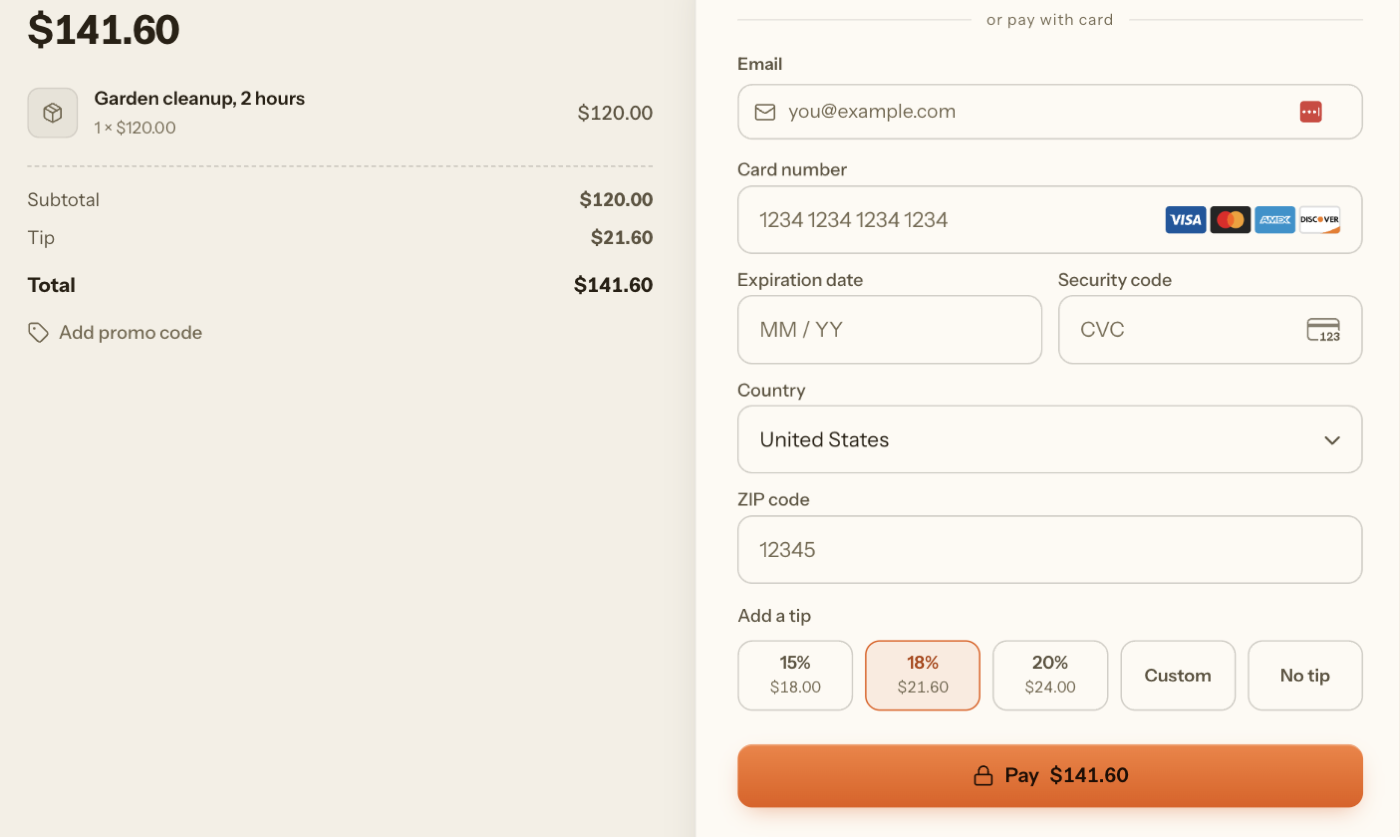
The link is live when the response returns. This is the page that request produces:

Flint hosted checkout for a $120.00 garden cleanup. Under the card form, an Add a tip row offers 15% ($18.00), 18% ($21.60), 20% ($24.00), Custom, and No tip. 18% is selected, the summary shows a $21.60 Tip line, and the button reads Pay $141.60.

The buyer gets three preset buttons with the dollar amount already worked out, a custom amount, and No tip, directly above the Pay button. Choosing one adds a Tip line to the summary and updates the total on the same page. There is no tip step to build and no session to recreate when the buyer changes their mind.

On small totals a percentage reads as pennies. Switch the presets to fixed amounts with the same block:

JSON
"tip": {
  "enabled": true,
  "is_smart_tips_enabled": true,
  "smart_tip_money_options": [
    {"amount": 100, "currency": "USD"},
    {"amount": 200, "currency": "USD"},
    {"amount": 500, "currency": "USD"}
  ],
  "is_custom_tip_enabled": true
}

With no code at all, turn on tipping once under Settings, then Tipping, in the dashboard, and the standard payment links you create there offer it.

The tip is not a product row. It is its own object on the order, so the order can always tell the sale from the gratuity:

JSON
"tips": [{
  "order_tip_id": "tip_1kmn0aExample",
  "status": "requested",
  "percent": 18,
  "effective_amount_money": {"amount": 2160, "currency": "USD"},
  "settled_amount_money": {"amount": 0, "currency": "USD"},
  "refunded_money": {"amount": 0, "currency": "USD"}
}],
"pricing_amounts": {
  "subtotal_money": {"amount": 12000, "currency": "USD"},
  "discount_money": {"amount": 0, "currency": "USD"},
  "charge_money": {"amount": 0, "currency": "USD"},
  "tax_money": {"amount": 0, "currency": "USD"},
  "requested_tip_money": {"amount": 2160, "currency": "USD"},
  "total_money": {"amount": 14160, "currency": "USD"}
}
  • Promotions discount items, never the tip. A percent tip is computed on the subtotal after discounts and before fees and tax.
  • Tips are never taxed. There is no tax code to remember.
  • Collected tips have their own total. When the payment succeeds the tip moves to settled, and settlement_amounts.settled_tip_money is the number to reconcile and pay staff from. The orders report carries a tip column.
  • Refunds say how much tip went back. Each refund reports refunded_tip_money, and the tip's status moves to partially_refunded or refunded.

If you run your own ordering UI instead of the hosted page, set the tip on the order with requested_tip as a fixed amount or a percent, and the same rules apply. The tips and fees guide covers both paths, along with delivery and service fees.

Stripe and Flint online tipping, side by side

Stripe Checkout and Payment LinksFlint checkout and payment links
Tip prompt on the payment pageNoneThree presets, a custom amount, and No tip
Percent presetsYour own UI, before the session existstip_percentages
Fixed-amount presetsOptional items, in multiples of one pricesmart_tip_money_options
Custom tip amountPay-what-you-want only, with no other itemsis_custom_tip_enabled
Tip and products in one paymentAs a product line item you addYes, as a tip on the order
Promotion codes and the tipDiscounted unless every coupon uses applies_toNever discounted
Tax and the tipPreset tax code unless you set NontaxableNever taxed
Where the tip is recordedA product row, or metadata you wrotetips[] on the order and settled_tip_money
Tip share of a refundYou work it outrefunded_tip_money on the refund

Questions, answered

Can you add a tip to a Stripe Payment Link?

Not as a tip prompt. Payment Links have no tipping setting. "Customers choose what to pay" lets the buyer set the whole price, and that price cannot share a link with other line items. The closest options are fixed-amount optional items on the link, or a second pay-what-you-want link after the purchase.

Does Stripe Checkout support tipping?

Stripe Checkout has no tip parameter. Your own page collects the tip before you create the session, and the tip goes in as a line item. Stripe's tipping features, on-reader and on-receipt, belong to Terminal for in-person payments.

Can I use Stripe Terminal tipping for online payments?

No. On-reader tipping shows its three suggestions on a physical card reader, and on-receipt tipping adds the tip when an in-person authorization is captured. Neither applies to Checkout, Payment Links, or the Payment Element.

Can a customer add a tip after paying online?

Not on the same payment. Adding a tip after authorization is on-receipt tipping, a Terminal feature for in-person payments in the US. Online, a later tip is a second payment, for example a pay-what-you-want Payment Link on your confirmation page.

How do I offer 15%, 18%, and 20% tip buttons with Stripe?

You build them in your own UI. Compute each percentage from your cart subtotal, then pass the chosen amount to Checkout as a line item or add it to the PaymentIntent amount. Stripe's hosted pages do no percentage math on a tip.

Does Stripe Tax charge tax on a tip line item?

It can. A line item without a tax code gets your account's preset product tax code. Assign the Nontaxable code, txcd_00000000, to the tip line if the gratuity should not be taxed.

Is there a hosted checkout with a tip prompt built in?

Yes. On Flint, a tip setting on a payment link or checkout session adds three preset buttons with the dollar amounts worked out, a custom amount, and No tip to the hosted payment page. The tip is recorded separately from the items, is never taxed, and promotions do not discount it.

Sources